How to sell products on WhatsApp, what is allowed and what is not

Table of Contents
Start with what is not allowed, not with the catalogue
Almost every guide on how to sell products on WhatsApp opens with the catalogue. That is the wrong order. Meta restricts entire product categories from being sold through WhatsApp, and if yours is one of them, nothing else in this guide applies.
Businesses that build a catalogue first and read the policy later lose the number, not just the catalogue. So the first question is whether you may sell products on WhatsApp at all.
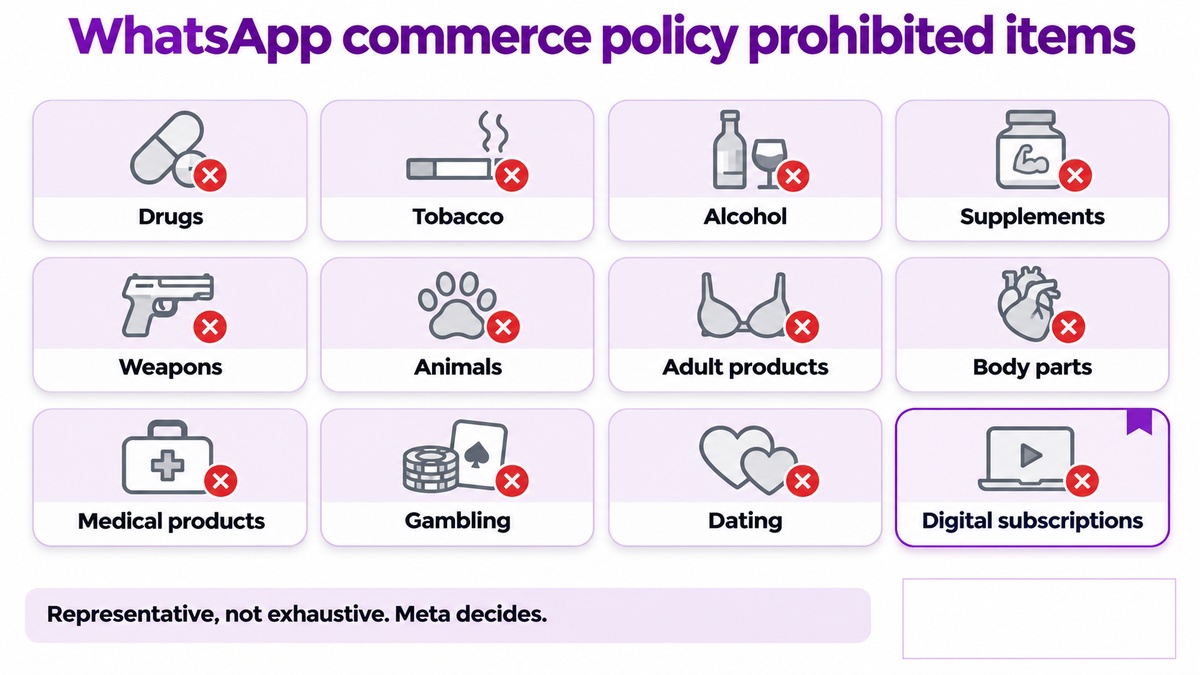
WhatsApp commerce policy prohibited items
Meta's commerce policy names the categories that cannot be sold. The list is representative rather than exhaustive, and Meta applies it at its own discretion.
Category | Note |
|---|---|
Illegal products or services | Judged against local law as well as Meta policy |
Drugs, prescription or otherwise | Manufacturers who do not sell direct have a carve out |
Tobacco and related paraphernalia | Includes vapes and accessories |
Alcohol | No volume or licence exemption |
Unsafe ingestible supplements | Judged on the ingredient, not the label |
Weapons, ammunition or explosives | |
Animals | |
Adult products or services | Contraceptive focused family planning products are carved out |
Body parts and fluids | |
Medical and healthcare products | Healthcare services that do not sell direct have a carve out |
Real money gambling | |
Dating services | |
Digital and subscription services | Including links to subscription sales, renewals or upgrades |
Real, virtual or fake currency |
The current wording lives on Meta's own policy page and changes without notice, so check it rather than this table before you launch.
The one most Indian businesses miss
Digital and subscription services. A SaaS company cannot sell a plan through WhatsApp commerce, and that includes a link that processes a renewal or an upgrade. Many Indian software businesses assume WhatsApp is open to them because their product is harmless. The category, not the harm, is what Meta reads.
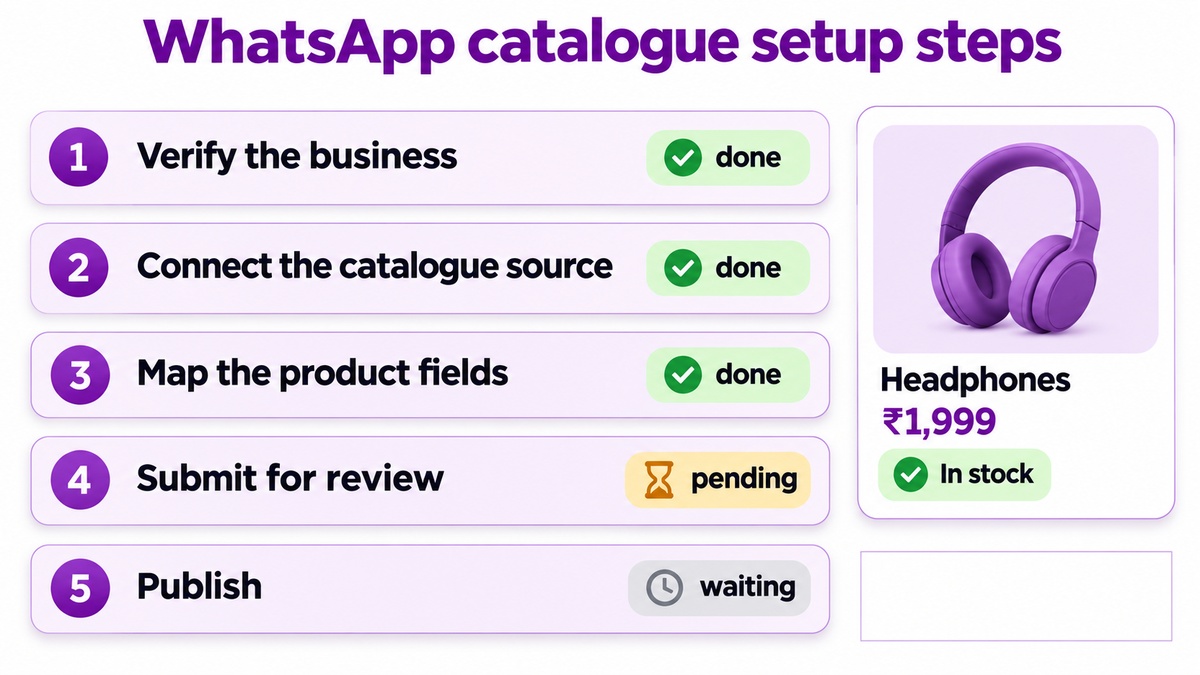
What you cannot sell on WhatsApp, in practice
Four cases that come up repeatedly when businesses try to sell products on WhatsApp.
A pharmacy listing medicines. Drugs are prohibited. A collection ready notification is fine, an order flow is not.
A clinic offering consultations. Medical and healthcare products are restricted, and Meta separately says not to use WhatsApp for telemedicine. Covered in our WhatsApp for healthcare India guide.
A software firm selling a subscription. Digital and subscription services are prohibited outright.
A store listing vapes alongside legal stock. Mixed catalogues are allowed, but only the permitted items may appear. If a customer asks about a prohibited one, move that conversation to another channel.
That last rule is useful and underused. Selling some restricted products does not bar you from WhatsApp. It bars those products from WhatsApp.
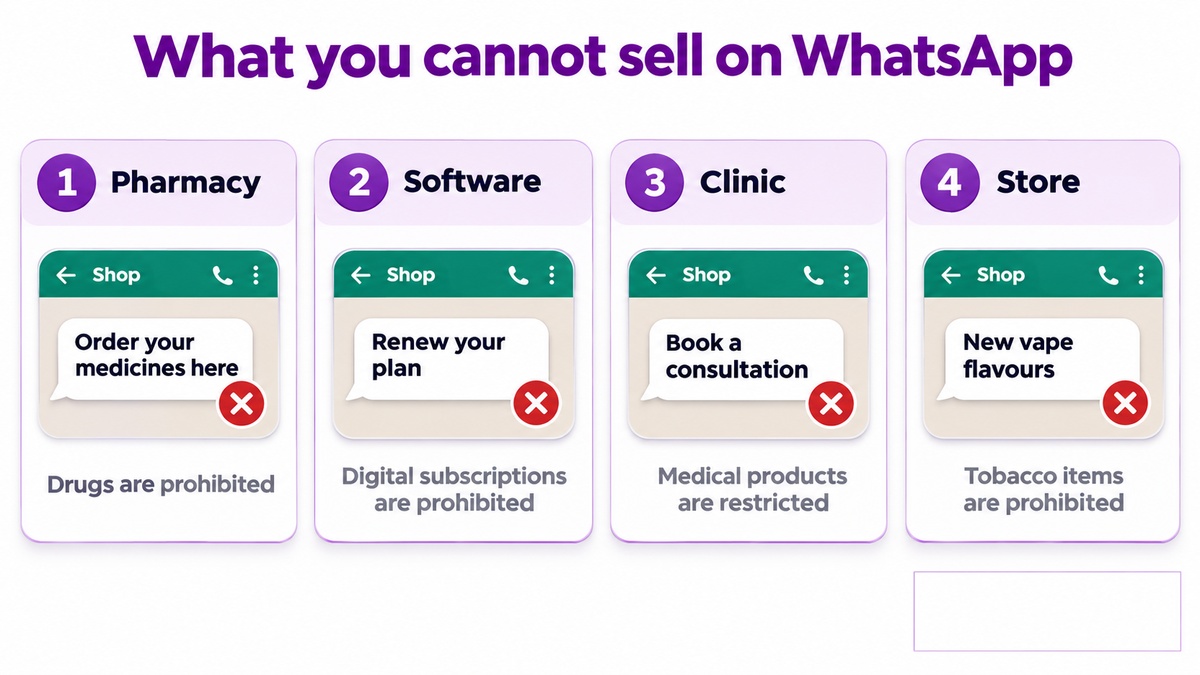
WhatsApp catalogue setup steps to sell products on WhatsApp
Once the category question is settled, the build is straightforward. These WhatsApp catalogue setup steps are the same whether you sell ten items or ten thousand.
Verify the business. Commerce features need a verified business in Meta Business Manager
Connect the catalogue source. Either built by hand, or synced from WooCommerce, Shopify or a feed
Map the product fields. Name, price, currency, image, description, availability, and a URL if you have one
Submit for review. Products are checked against the commerce policy, and rejections are per product, not per catalogue
Publish and test on a real handset. How a product card renders is not always how it looked in the dashboard
Keep the catalogue smaller than your full range at first. A hundred clean products beat a thousand with missing images, because a rejected product slows the review of the rest.
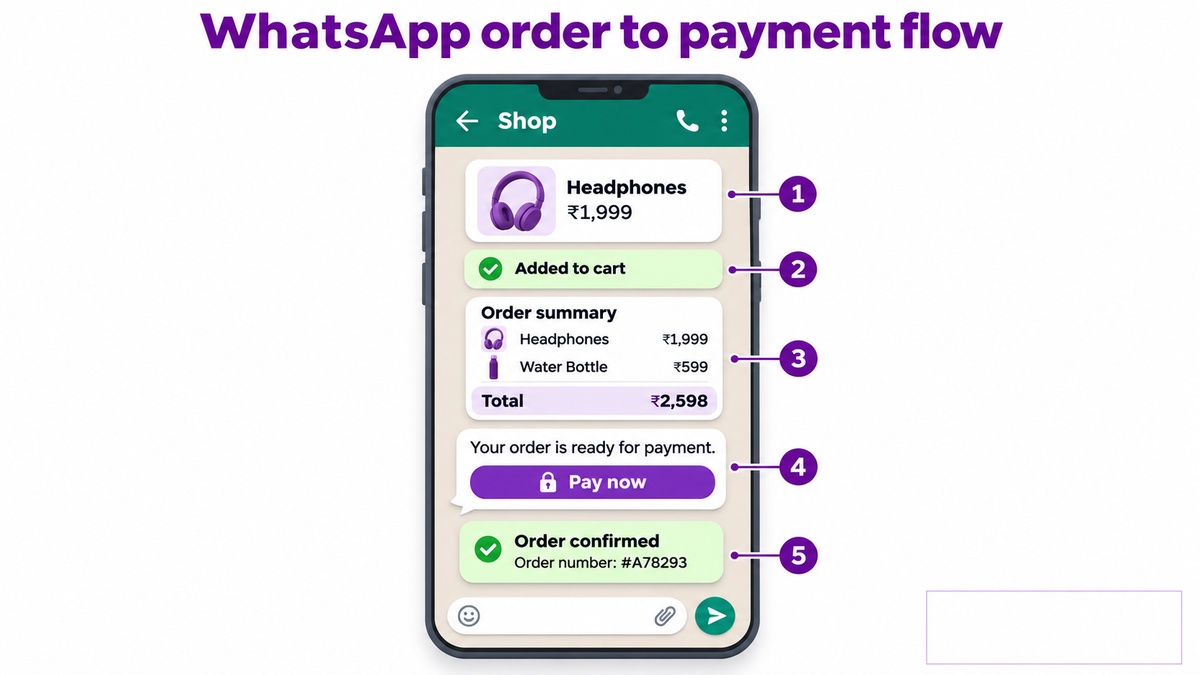
The WhatsApp order to payment flow
What the customer actually experiences when you sell products on WhatsApp is a short sequence, and the fewer steps that leave the thread, the better it converts.
A product card, sent by an agent or returned by a chatbot
Items added to a cart inside the conversation
An order summary with a total the customer can read before committing
A payment step, either a link or a native flow depending on what is enabled for your market
A confirmation carrying an order number, which also opens a service window for questions
The payment step is where most Indian implementations send customers to a web page. That works, and it costs you a measurable share of carts. Keeping payment inside the thread is worth the integration effort if volume justifies it.
What the messages cost
Order confirmations and shipping updates are utility messages. Promotions about the same products are marketing messages and cost several times more. The split is set out in our WhatsApp API conversation pricing guide, and it matters more for commerce than for any other use case because the volume is high and recurring.
Who should not sell products on WhatsApp at all
Two situations where the honest answer is no, even when the category is permitted.
The first is a business with no stock discipline. A catalogue that shows an item as available when it is not produces complaints inside the thread, and those complaints raise your block rate faster than any campaign.
The second is a business selling one high value item a month. The build cost will not pay back, and a phone call closes that sale better than a product card ever will.
Where this goes wrong after launch
Three failures, all avoidable.
Catalogue drift. A product added later that breaches policy puts the whole catalogue under review
Marketing dressed as an order update. Meta recategorises it, the cost rises, and quality rating falls. See quality rating
No opt out on promotional sends. Block rate climbs and the number gets restricted. Sending bulk WhatsApp messages legally covers the rules
If the number is already restricted, diagnosing a disabled WhatsApp API account is the place to start.
Common questions
Can any business sell products on WhatsApp?
No. Meta prohibits entire categories including drugs, alcohol, tobacco, medical products, gambling, dating and digital subscriptions. Check the category before building anything.
What you cannot sell on WhatsApp if the catalogue is mixed?
Only the permitted items may be listed. You can keep trading in the rest elsewhere, and you must move a conversation about a prohibited product to another channel.
Do the WhatsApp catalogue setup steps need a developer?
Not for a hand built catalogue. A sync from WooCommerce or Shopify usually does, or a provider who has already built the connector.
Is payment inside the WhatsApp order to payment flow available in India?
Availability depends on market and account, so confirm with your provider. A payment link always works as a fallback and costs you some conversion.
Are order updates charged as marketing?
No, a genuine order update is a utility message. Add an offer to it and Meta recategorises it as marketing at several times the cost.
Where to start with Celitix
Celitix connects a WooCommerce or Shopify catalogue to WhatsApp and wires the order to payment sequence, and we will tell you before any work starts if your category cannot sell products on WhatsApp.
Before committing to any provider, our buyer's guide sets out what to get in writing.
Ask Celitix if your catalogue qualifies