Step-by-Step Guide to Create WhatsApp Templates with Celitix
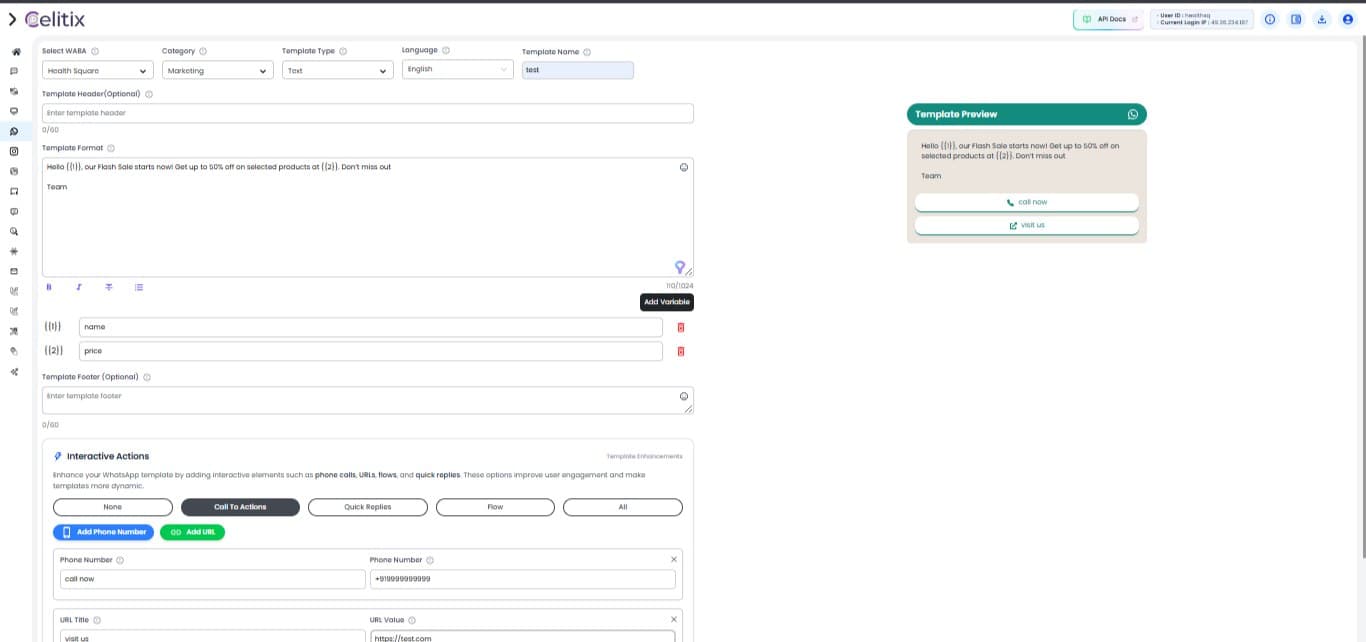
Step-by-Step Guide
Step 1: Select your WABA Account. Step 2: Select your category, whether you want template to be approved under marketing, utility or authentication. NOTE: Marketing: Promotional messages meant to upsell, announce offers, product updates, or re-engage customers. Example: Get 20% off your next purchase! Utility: Transactional or service-related messages that provide updates or information requested by the user. Example: Your order #1234 has been shipped. Authentication: Messages used for security and verification, like sending OTPs or login codes. Example: Your verification code is 678910. Step 3: Select template type whether it is text, image, video, document, and carousel. Step 4: Need to select language. Step 5: Mention template name. Step 6: Mention template header, it is totally optional and it is a top section of a WhatsApp message template and also useful to highlight the main purpose of template and its length should be 60 characters. Step 7: Type your template under 1024 character length; you can add up to 10 variables under template. Step 8: Mention template footer, it is totally optional basically it is used for brief notes like short reminders. (Reply ‘STOP’ to unsubscribe) Step 9: Select interactive actions which let users engage directly with your message.
Call to Actions
- Phone Call: Lets users tap to call a number
- URL: Opens a website when tapped. Useful for promotions, support, or product pages.
Quick Replies
- Great for collecting feedback or guiding next steps (e.g., “Yes”, “No”, “More info”).
Flow
- Flow in Interactive Actions lets users follow a guided, step-by-step journey inside WhatsApp, such as booking, form filling, or support.
- It helps businesses automate conversations and collect inputs without manual replies.

Elevate Your Customer Experience
Go beyond the ordinary and connect with your target groups to grow your business.