WhatsApp blue tick verification, who qualifies and why applications fail
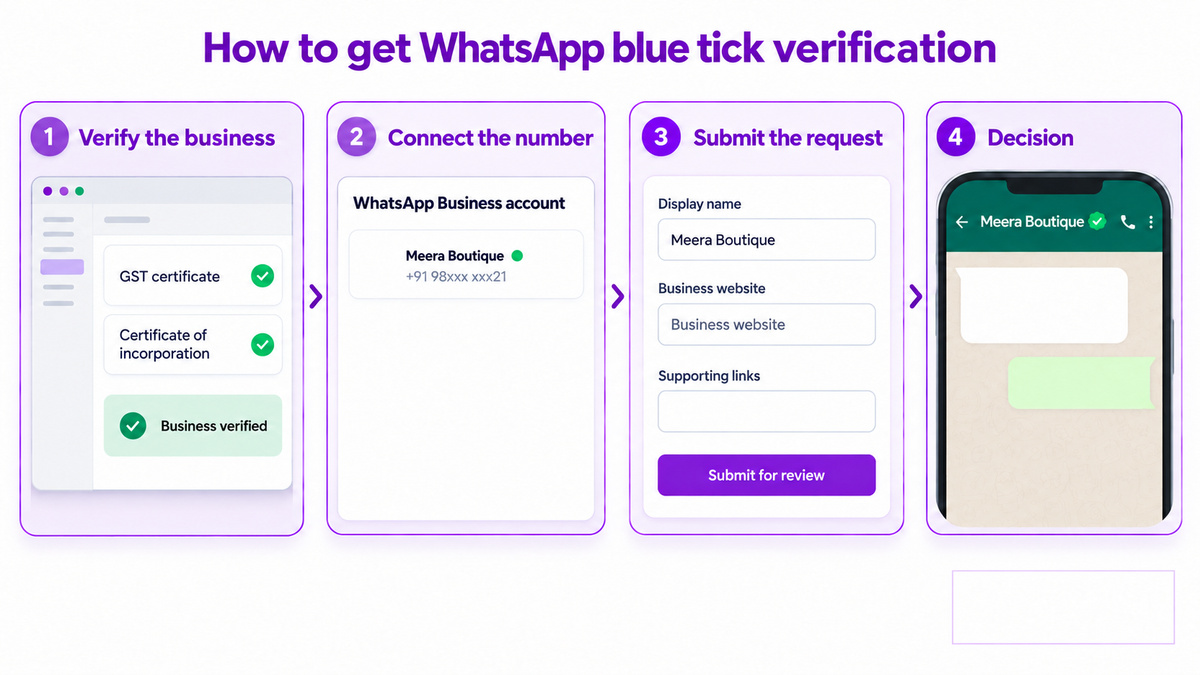
A customer gets a message from a number they do not recognise, asking them to confirm an order. Nothing in the message proves who sent it. They ignore it, or worse, they report it.
WhatsApp blue tick verification replaces that uncertainty with a name, a logo and a mark the customer can see. In a market where messaging fraud is routine, that is the product.
What is on this page
WhatsApp blue tick verification, what the mark actually does
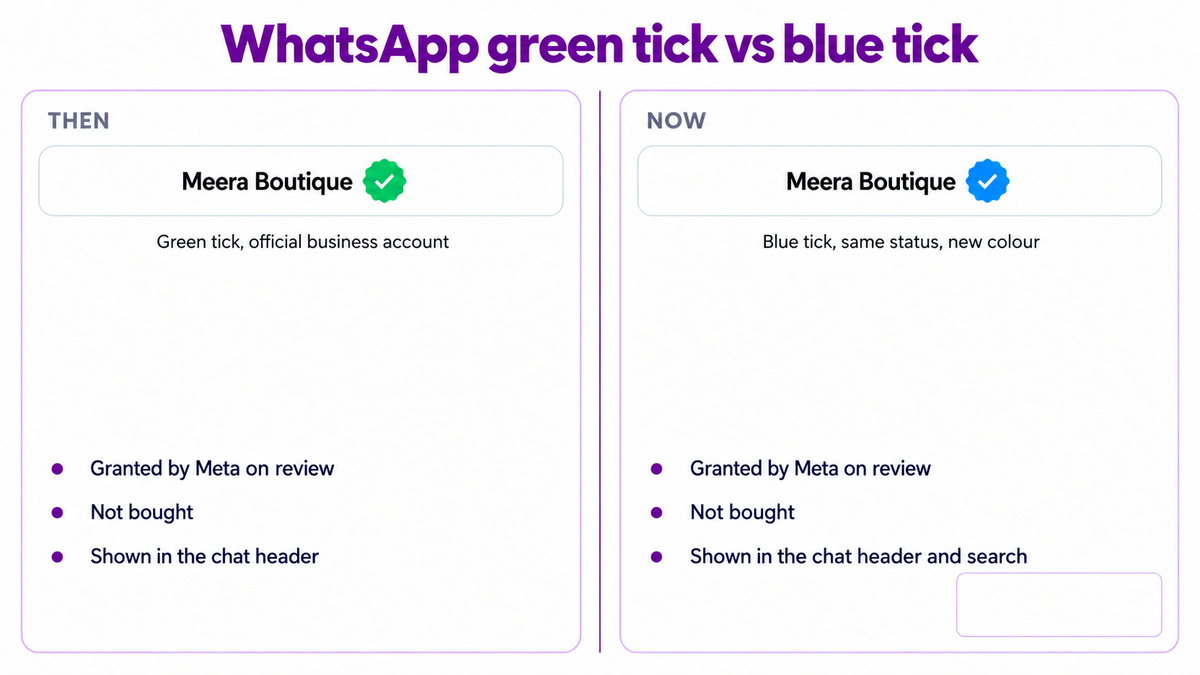
WhatsApp green tick vs blue tick, and why the names confuse people
WhatsApp blue tick eligibility, the realistic checklist
How to apply for WhatsApp blue tick verification, by route
WhatsApp blue tick rejection reasons
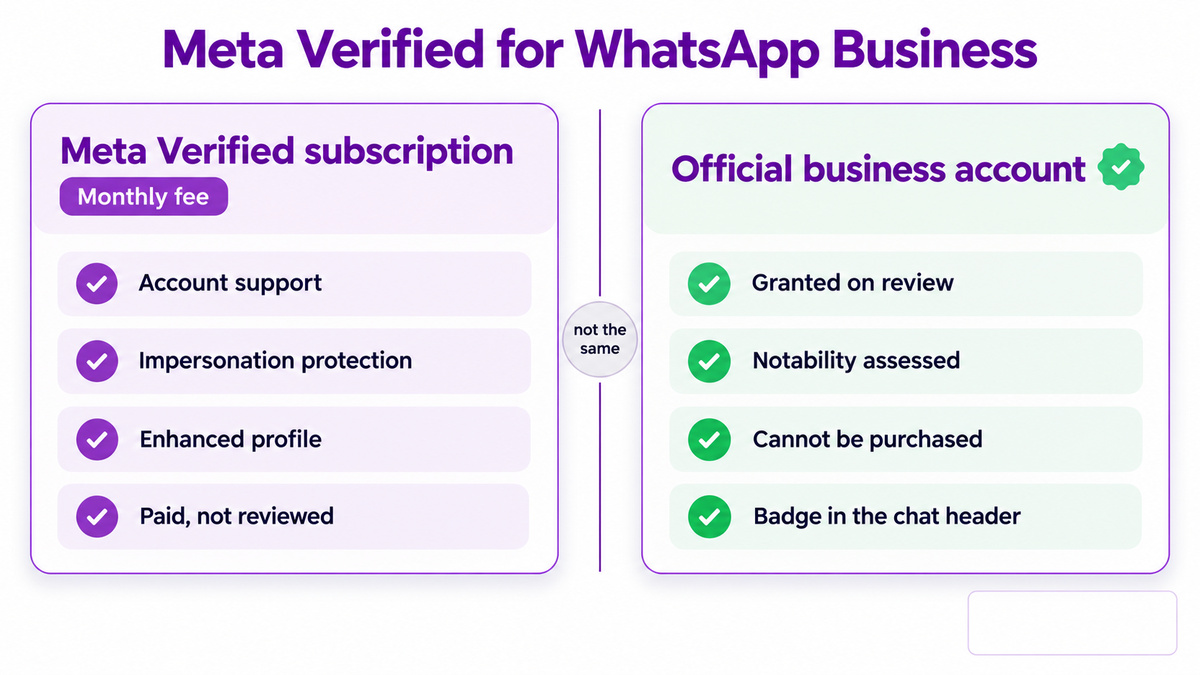
Meta verified for WhatsApp business, and what it is not
What to do if you are rejected
Common questions
Key takeaways
The mark is about trust, not reach. It does not improve delivery or raise your sending limits.
Meta has changed the badge naming and the routes more than once. Check its current documentation before you apply.
Business verification and an approved display name come first. Without both, nothing else matters.
Most rejections are notability, not paperwork. Independent coverage of your brand is what is being assessed.
A rejection is not permanent. You can reapply, but build the case before you do.
WhatsApp blue tick verification, what the mark actually does
WhatsApp blue tick verification changes what the customer sees before they read a word. Instead of a bare number, the thread shows your business name, your logo and a verification mark.
Fewer ignored messages - a recognised sender gets opened.
Fewer impersonation attempts succeed - customers learn to expect the mark.
Fewer are you really the bank calls - which is real support volume removed.
No change to delivery or limits - this is the part people get wrong.
That last line is worth repeating. WhatsApp blue tick verification does not raise your messaging tier, improve delivery rates or soften template review. It is a trust signal and nothing else.
WhatsApp green tick vs blue tick, and why the names confuse people
Nothing about WhatsApp blue tick verification confuses people more than the naming. The WhatsApp green tick vs blue tick question generates more confusion than any other part of this topic, and the confusion is reasonable. Meta has revised both the badge design and the routes to get one more than once.
Rather than repeat a version that may already be out of date, the practical position is this. There is a verification mark shown against verified business accounts, Meta controls what it looks like and who qualifies, and it has changed the naming before.
Historically the mark shown to verified business accounts was described as a green tick.
More recently Meta has moved toward a blue badge consistent with its other platforms.
The underlying idea has not changed - a verified business is shown differently from an unverified one.
Check Meta directly before quoting the current state to a client or a customer.
If you already hold the older mark, do not assume it carries over automatically or that it lapses. The WhatsApp green tick vs blue tick transition has been handled differently at different times, so confirm your own account status in Business Manager rather than reading it from a blog.
WhatsApp blue tick eligibility, the realistic checklist
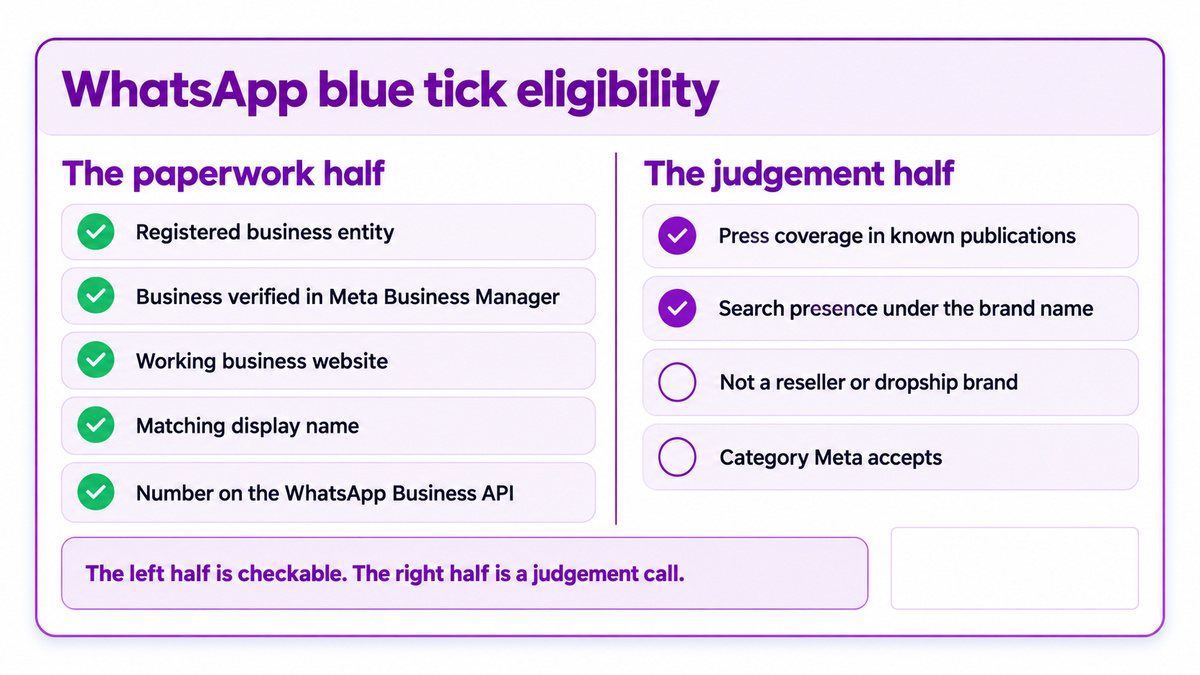
WhatsApp blue tick verification is assessed in two halves. WhatsApp blue tick eligibility has a paperwork half and a judgement half. The paperwork is the easy part and most applicants pass it.
The paperwork half
Business verification complete in Meta Business Manager, with real documents.
Display name approved and matching the business you actually operate.
Two step verification enabled on the number.
A working website that clearly belongs to the same business.
The judgement half
This is where WhatsApp blue tick verification is really decided. Meta is assessing whether your brand is notable enough to be worth impersonating, and it looks for evidence from sources that are not you.
Independent coverage - news articles, industry publications, recognised directories.
Not paid placement - sponsored posts and paid PR are routinely discounted.
Not your own channels - your blog, your social accounts and your press releases do not count.
Recent and substantive - a passing mention from six years ago carries little weight.
WhatsApp blue tick eligibility therefore favours businesses that have been written about. If nobody independent has covered you, that is the gap to close before applying, not the application itself.
How to apply for WhatsApp blue tick verification, by route
The route to WhatsApp blue tick verification depends on how your number is set up, and the two are genuinely different processes.
If your number runs on the WhatsApp Business API
Open WhatsApp Manager and find the phone number.
Go to the number settings and the profile section.
Submit the request, supplying your website, country, primary language and parent company if different.
Add the independent links that support your case. Choose the strongest, not the most.
If you are on the free Business app
Routes for smaller businesses on the free app have existed at various points, usually tied to a paid Meta Verified subscription rather than the notability assessment above. Availability varies by country and changes, so check what your account is actually offered rather than following a guide.
WhatsApp blue tick rejection reasons
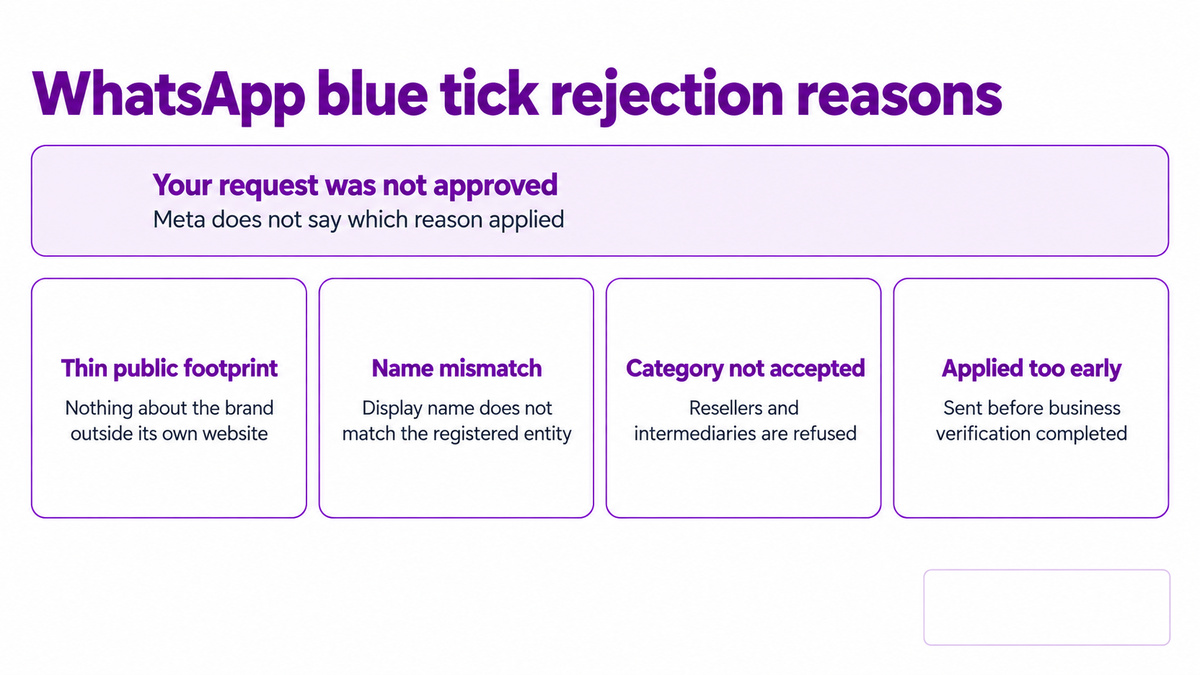
Most WhatsApp blue tick rejection reasons come down to the same handful of problems, and only one of them is about documents.
Not enough independent coverage. By far the most common. The business is real but has not been written about.
Paid coverage submitted as proof. Sponsored articles are identified and discounted.
Name mismatch. The display name, the website and the registered entity do not line up.
Restricted category. Some sectors cannot be verified at all.
Incomplete business verification. The underlying Meta business is not verified yet.
None of these WhatsApp blue tick rejection reasons are usually explained in the notice you receive, which is why working through them in order is more productive than appealing blind.
Meta verified for WhatsApp business, and what it is not
There is a second route worth naming. Meta verified for WhatsApp business is a subscription product, and it is a different thing from the notability based verification described above, even though both end in a badge.
It is paid monthly rather than assessed once.
It bundles other things - support access and account protection, depending on the tier.
Availability varies by country and by account type.
It does not replace business verification - you still need that underneath.
Deciding between meta verified for WhatsApp business and the application route is mostly a question of whether you would pass the notability test. If independent coverage is thin, the subscription may be the only route available to you.
What to do if you are rejected
A refused WhatsApp blue tick verification is a starting point rather than a verdict, provided you change something before reapplying.
Wait the required period before resubmitting. Immediate resubmission achieves nothing.
Earn coverage first - a genuine article in a real publication is the highest value work here.
Fix name consistency across the website, the registration and the display name.
Complete business verification if it is still outstanding.
Reconsider whether you need it - an approved display name already shows your business name in the thread.
That final point matters. WhatsApp blue tick verification is useful, not essential. Plenty of businesses run successful messaging with an approved display name and no badge at all.
Common questions
Does verification improve message delivery?
No. It changes what the customer sees, not how messages are routed. Delivery depends on your quality rating and your sending limits, which verification does not affect.
Can I pay to get verified faster?
The subscription route is a separate product rather than a fast lane for the assessed one. Paying does not influence a notability decision.
How long does a decision take?
Usually a few days once submitted, though it varies. The long part is usually building the case beforehand, not the review itself.
Do I need verification to send messages?
No. An approved display name is enough to show your business name in the thread. Verification adds the badge on top of that.
Will my existing mark change?
Check your own account in Business Manager. Meta has handled badge changes differently at different times and your status is the only reliable source.
Where to start with Celitix
Business verification, display name approval and the application are all part of onboarding. The full picture sits on the WhatsApp verification page, and Celitix runs the WhatsApp Business API with a WhatsApp chatbot, WhatsApp live chat and CRM integrations on one CPaaS platform.
Add bulk SMS, RCS business messaging and user verification for the channels where a verified sender matters most. The setup guide covers onboarding, financial services shows a regulated example, and pricing will size it.
Meta publishes the current requirements, which change, so check them from source: WhatsApp Business Platform overview.
Book a free Celitix demo